
- SureCookie Installation Guide
- Installing SureCookie Pro
- Updating SureCookie
- How to Set Up SureCookie: Onboarding Wizard Guide
- SureCookie Dashboard Overview
- Connecting Your Site to SureCookie (Scanner Setup)
- Using SureCookie on Multiple Sites
- Uninstalling SureCookie & Data Cleanup
- Preferences Settings (Menu, Branding, Analytics)
- Customizing Banner Content
- Customizing Banner Layout
- Custom CSS for Banner Styling
- How to Configure the Floating Widget
- Customizing the Preference Modal
- Controlling Where the Cookie Banner Appears
- Customizing Banner Colors (Custom Colors, WCAG)
- Customizing the Blocked Content UI
- Banner Text in the Wrong Language (WPML, Polylang, and Locales)
- Re-Consent
- Understanding SureCookie Logs
- How to Set Up Geographic Targeting
- Block Scripts Until Consent (Resource Blocking)
- Setting Up Google Consent Mode v2
- Consent Models Explained (Opt-in vs Opt-out)
- Exporting Consent Logs (PDF Proof + CSV)
- Consent & Data Settings (Duration, Retention, Renew)
- Consent Forwarding Across a Multisite Network
- Resource / Script Blocking (Add Embeds + Fixes)
- Troubleshooting SureCookie
- Fix a Stuck or Failed Cookie Scan
- Why Some Cookies Aren’t Detected
- Banner Not Appearing: Troubleshooting
- Settings or Cookie Categories Not Saving or Loading
- Embeds Blocked After Consent (YouTube, Maps, Vimeo)
- Scanning Your Site From Your Browser
- Importing and Exporting SureCookie Settings
- Verifying Your Domain With a DNS Record
- Why reCAPTCHA Is Blocked, and How to Release It
- Is SureCookie a Google-Certified CMP?
- Where Banner and Widget Settings Live, and Which One Wins
- Why Trackers Still Fire Before Consent
- Is SureCookie GDPR Compliant? (Overview)
- Whitelisting the SureCookie Scanner
- Excluding the SureCookie Banner from LiteSpeed Cache
Why Trackers Still Fire Before Consent
SureCookie holds non-essential scripts and embeds back until a visitor accepts them. So when you open your site in a private window, answer nothing, and still see Google Analytics or a pixel running, it reads as broken.
Usually it is not. Six explanations cover almost every report, and only one is a fault. Start with the case matching your symptom.
Before you begin: blocking is part of the free plugin. Block Scripts Until Consent lives on SureCookie > Tracking Manager > Scripts and Embeds, the page that shows what SureCookie does with each resource.
Case 1: Google Analytics, Tag Manager or Maps Loads Before Consent
Issue. A Google service shows a Managed by GCM badge instead of Blocked until consent, and the request goes out before anyone accepts.
Solution. Nothing is wrong. With Enable Google Consent Mode and blocking both on, SureCookie deliberately exempts Consent Mode compatible Google services from file-level blocking. Consent Mode is Google’s own mechanism: the tag loads, receives a consent signal, and adjusts itself. Blocking the file and sending the signal at once gives you neither.
Until the visitor consents, SureCookie sends every Consent Mode category as denied, with ad data redaction and URL passthrough on. The tag runs, but may not write cookies or use advertising identifiers. It does still contact Google.
Expand Managed by Google Consent Mode there to see which services it covers.
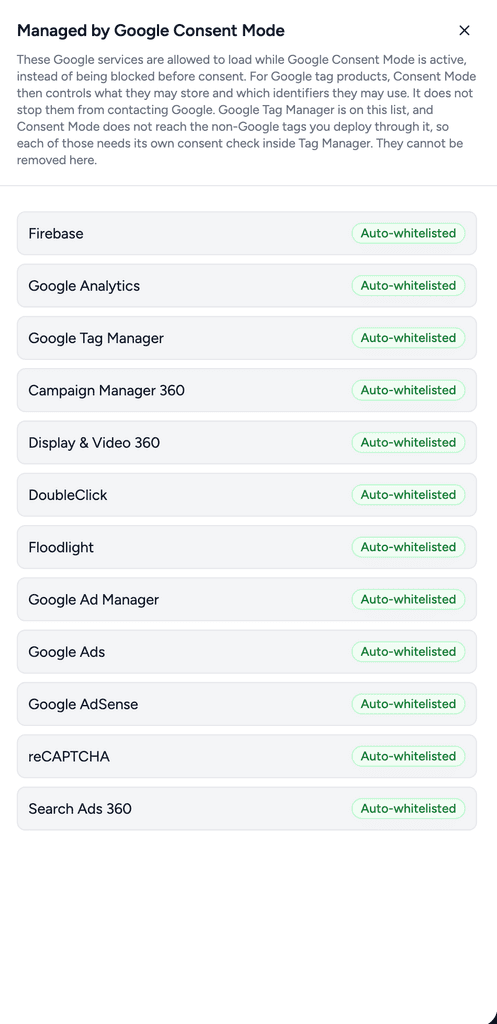
- Google Tag Manager is on that list, and Consent Mode does not reach the non-Google tags you deploy through it. Each needs its own consent check inside Tag Manager.
- To block the Google files outright, turn Enable Google Consent Mode off under SureCookie > Settings > Consent Frameworks > Google Consent Mode. The exemption applies only while Consent Mode is on. Read Setting Up Google Consent Mode v2 first.
Case 2: You Turned Blocking On and Nothing Changed
Issue. Block Scripts Until Consent is on, you saved, and the page loads as before.
Solution. Two switches sit above blocking, and either one silently wins.
- Check SureCookie > Settings > Banner > Content. If Enable Cookie Banner is off, nothing is blocked at all, whatever the blocking toggle says.
- Return to Scripts and Embeds and confirm Block Scripts Until Consent is still on. Before 1.5.0, switching the banner off switched this off too, and turning the banner back on did not restore it.
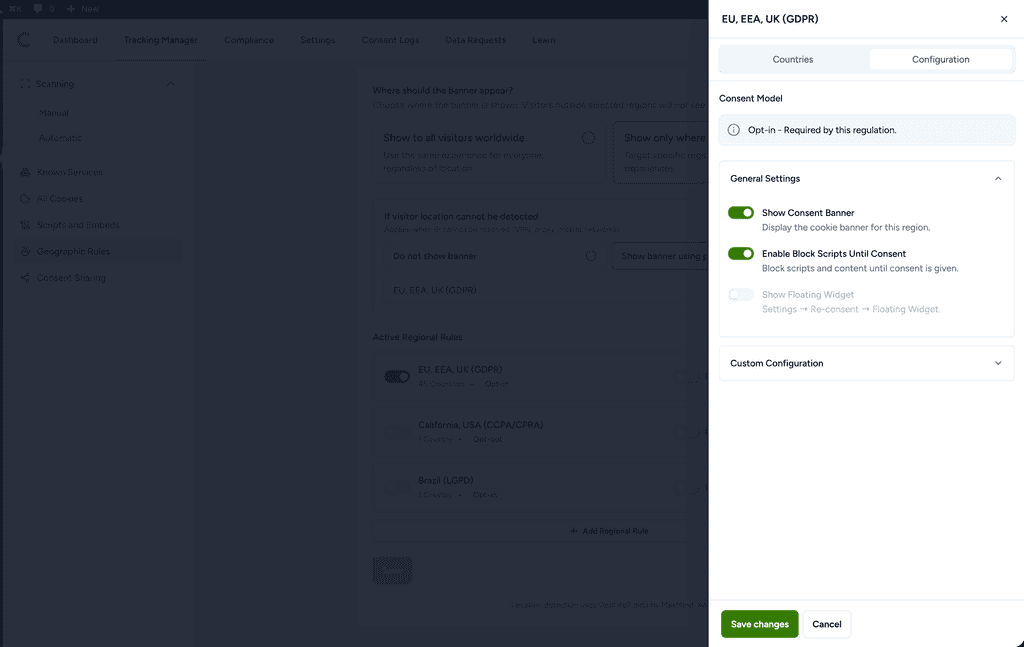
SureCookie Pro Geographic Rules add a third switch. In selected regions mode each rule carries its own Enable Block Scripts Until Consent, and the rule decides, not the global toggle. Two traps follow.
- The California, USA (CCPA/CPRA) template ships with blocking off, because opt-out means trackers run until the visitor declines. Turn it on only if you mean to.
- A visitor whose country matches no enabled rule is not blocked at all. If your rules cover the EU only, everyone else loads everything.
Case 3: It Behaves Differently in Two Browsers, or the Toggle Seems Inert
Issue. The same page blocks in one browser and not another, or a setting change makes no difference for hours.
Solution. Clear every cache layer in order: your caching plugin, your host’s page cache, then your CDN. Retest in a private window. This is the most common reason a blocking change appears to do nothing. Blocking rewrites the HTML your server sends, so the result sits inside cached pages, and an older page carries an older decision.
Case 4: A Tracker Set to Blocked Still Records
Issue. The resource shows Blocked until consent, and the analytics tool still reports the visit.
Solution. Check whether the tracker is proxied through your own domain. Some offer this, often as Avoid ad blockers, serving the vendor’s script from your site under a generated file name. SureCookie matches the address a resource loads from, so a script arriving from your own domain never matches the vendor’s.
Turn that proxy option off in the tracker’s plugin, then rescan. The resource reappears under its real address, where a rule can reach it.
If you keep the proxy, a rule on the generated file name works until that name changes. Never use your own domain as the pattern: patterns match as a substring of the whole URL, so it would match every asset on the page.
Case 5: The Service Is Not in the List at All
Issue. A tracker you want blocked was never detected, or is not a service SureCookie recognises.
Solution. Add a rule by hand.
- Go to SureCookie > Tracking Manager > Scripts and Embeds.
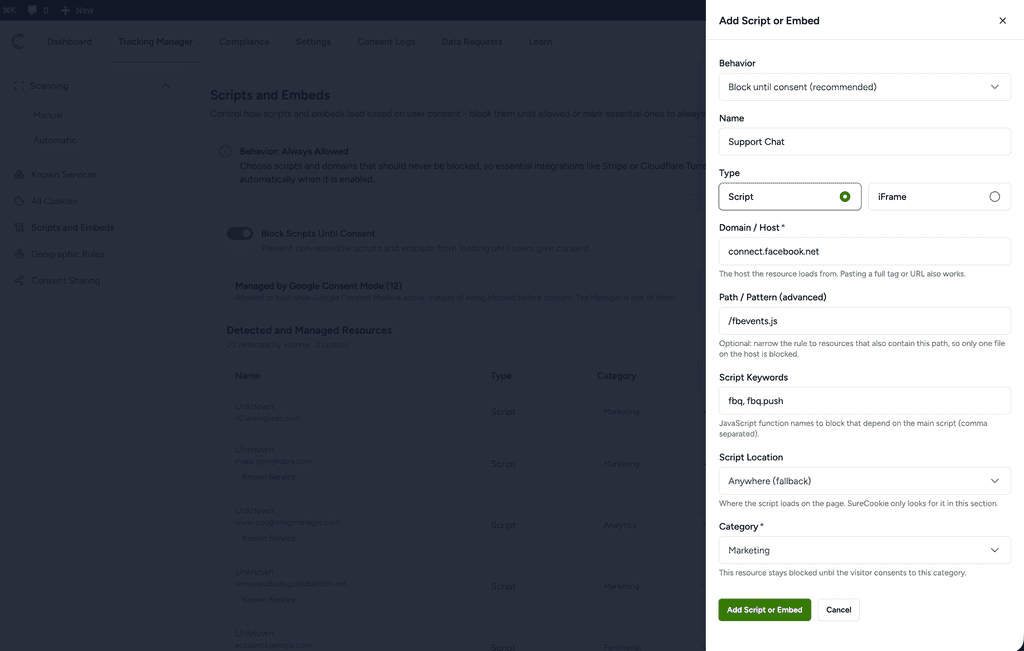
- Click New Resource to open the Add Script or Embed drawer.
- Set Behavior to Block until consent (recommended).
- Enter a Name, pick a Type of Script or iFrame, and enter the Domain / Host the resource loads from, such as
connect.facebook.net. - Choose the Category that governs it, then save.
Name the full host, not a fragment: a bare token matches far more than you intend. See Resource / Script Blocking (Add Embeds + Fixes) for embeds and Using Known Services for entries you get without typing anything.
Case 6: Blocking Works, but It Broke Something
Issue. Consent gating is working, and a form, an ad unit or an editing toolbar stopped.
Solution. Pick the closest match:
- reCAPTCHA stops a form being submitted. Recategorising it does not help: only the Essential category loads without consent. See Why reCAPTCHA Is Blocked, and How to Release It.
- An embed stays blocked after the visitor accepts. See Embeds Blocked After Consent (YouTube, Maps, Vimeo).
- A page builder’s popups or query loops stopped working. See Page Builder Popups and Query Loops Stopped Working.
- A tag records nothing after consent and the console says a function is not defined. The part of the tag that defines it is held while the part that calls it is not. See Case 7 below.
- Scripts are blocked for logged-in staff. In SureCookie Pro, excluding a user role under SureCookie > Settings > Banner > Visibility hides the banner only. Scripts stay blocked for those visitors until Allow Tracking Scripts on Excluded Locations on the same screen is on. Leave it off unless you need it: it lets trackers run with no banner in sight.
Since 1.5.0, blocking pauses inside a front-end page builder’s editing screen, so builder toolbars work, but it still applies when a logged-in editor browses the site normally.
Case 7: A Tag Stopped Working After Consent, and the Console Says Something Is Not Defined
Issue. Consent is accepted, but the tag records nothing. The browser console shows an error such as fbq is not defined, gtag is not defined or dataLayer is not defined, usually pointing at an inline script.
Cause. Some plugins split one tag across several scripts. One script defines the function and loads it from the vendor, so it carries an address we recognise and we hold it. The other scripts only call that function, and they are often served from your own domain, so there is no third-party address for us to match and they are not held.
The callers then run while the definition is still held, and fail. By the time the visitor accepts and we release the first script, those calls have already happened, so nothing is recorded and the vendor reports no tag installed. Meta for WooCommerce is the common example, but any plugin built this way behaves the same.
Solution. Blocking rules have a Script Keywords field for exactly this. It matches JavaScript function names inside inline code, which is what an address cannot reach.
- Go to SureCookie > Tracking Manager > Scripts and Embeds.
- Click New Resource.
- Enter a Name, set Type to Script, and pick the Category the tag belongs to.
- In Domain / Host, enter something common to the dependent files. A plugin folder name works well, for example
facebook-for-woocommerce. - In Script Keywords, enter the function name from the console error, for example
fbq. Separate several with commas. - Save, then clear any page cache.
Refer as above screenshot.
Once the callers are held too, the error disappears before consent, because nothing is calling a function that is not there yet. After the visitor accepts, we release the held scripts in page order, so the definition runs before the calls and the tag initialises normally.
Tip: the console error names the function for you. Whatever appears before “is not defined” is what belongs in Script Keywords.
Known Limitations
These are open with our development team, listed so you recognise them instead of reconfiguring around them.
- Markup written into the page as a string. SureCookie rewrites the HTML your server sends, and since 1.4.0 a browser-side guard also parks scripts, embeds and stylesheets built in the browser after load. That covers most page builder and tag manager cases, but not markup written in wholesale through
document.write, which reaches neither layer. Rebuilding those pages by hand is not the answer, and we are not asking for it. - Script-rendered maps and media. A few plugins draw their own content after consent, and the placeholder can stay on top of it.
- Geographic Rules with a full-page cache. The blocking decision is made once and cached, while the banner decides the region in the browser, so the two can disagree.
One related behaviour is not a defect. The scanner and the blocker legitimately disagree: the scanner loads your pages in a real browser and sees the finished page, while blocking sees only what your server sent.
Next Steps
Rescan after any change here, so Scripts and Embeds reflects what your site loads. See Block Scripts Until Consent (Resource Blocking) for how the list is built, and Automatic (Scheduled) Scanning to keep it current.
We don't respond to the article feedback, we use it to improve our support content.