
- SureCookie Installation Guide
- Installing SureCookie Pro
- Updating SureCookie
- How to Set Up SureCookie: Onboarding Wizard Guide
- SureCookie Dashboard Overview
- Connecting Your Site to SureCookie (Scanner Setup)
- Using SureCookie on Multiple Sites
- Uninstalling SureCookie & Data Cleanup
- SureCookie Shortcodes Reference
- Preferences Settings (Menu, Branding, Analytics)
- Customizing Banner Content
- Customizing Banner Layout
- Custom CSS for Banner Styling
- How to Configure the Floating Widget
- Customizing the Preference Modal
- Controlling Where the Cookie Banner Appears
- Customizing Banner Colors (Custom Colors, WCAG)
- Customizing the Blocked Content UI
- Banner Text in the Wrong Language (WPML, Polylang, and Locales)
- Re-Consent
- Understanding SureCookie Logs
- How to Set Up Geographic Targeting
- Block Scripts Until Consent (Resource Blocking)
- Setting Up Google Consent Mode v2
- Consent Models Explained (Opt-in vs Opt-out)
- Exporting Consent Logs (PDF Proof + CSV)
- Consent & Data Settings (Duration, Retention, Renew)
- Consent Forwarding Across a Multisite Network
- Resource / Script Blocking (Add Embeds + Fixes)
- Troubleshooting SureCookie
- Fix a Stuck or Failed Cookie Scan
- Why Some Cookies Aren’t Detected
- Banner Not Appearing: Troubleshooting
- Settings or Cookie Categories Not Saving or Loading
- Embeds Blocked After Consent (YouTube, Maps, Vimeo)
- Site Performance / Page Speed
- Scanning Your Site From Your Browser
- Importing and Exporting SureCookie Settings
- Verifying Your Domain With a DNS Record
- Why reCAPTCHA Is Blocked, and How to Release It
- Is SureCookie a Google-Certified CMP?
- Where Banner and Widget Settings Live, and Which One Wins
- Why Trackers Still Fire Before Consent
- Is SureCookie GDPR Compliant? (Overview)
- Whitelisting the SureCookie Scanner
- Excluding the SureCookie Banner from LiteSpeed Cache
Embeds Blocked After Consent (YouTube, Maps, Vimeo)
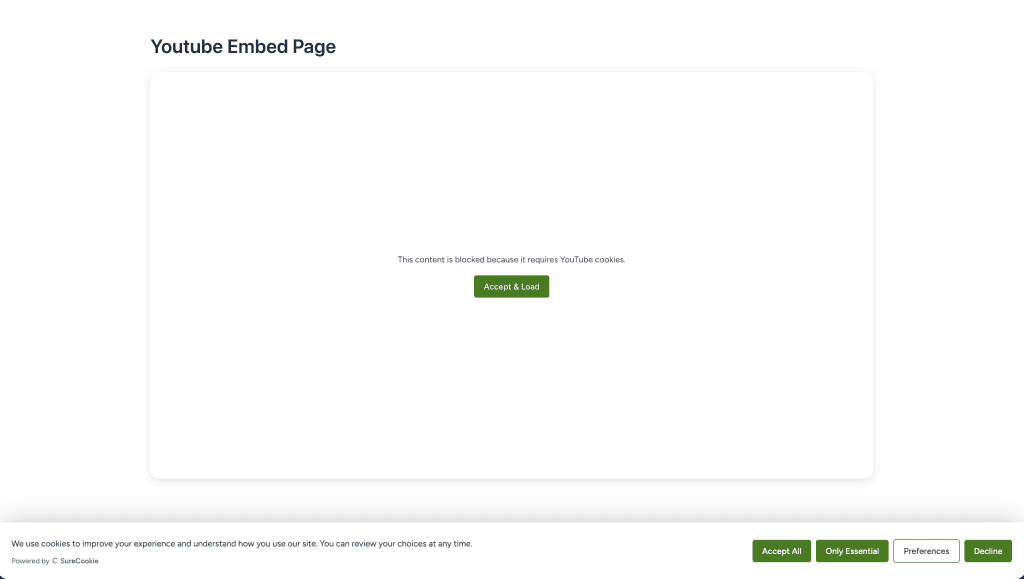
SureCookie’s Scripts and Embeds hold third-party embeds like YouTube, Google Maps, and Vimeo until a visitor consents, showing a placeholder in their place.
When an embed stays blocked even after someone has given consent, there are three usual causes. The embed belongs to a consent category the visitor did not accept, a cache is serving the pre-consent version of the page, or Compliance Guard is holding the embed’s domain until an administrator reviews it.
The first two end the same way: once the visitor accepts the category the embed needs, it loads right where it was, with no page reload required. A domain held by Compliance Guard behaves differently. No consent choice releases it, so read “The Domain Is Held by Compliance Guard” below before you spend time on categories and caches.
How Embeds Are Blocked and Unblocked
When blocking is on, SureCookie replaces each third-party embed with a placeholder and holds it until consent. Every embed is assigned a consent category:
- YouTube and Vimeo are usually Marketing.
- Google Maps is usually Functional.
The embed loads when the visitor accepts the category it belongs to. If they accept some categories but not that one, the embed stays blocked, and that is the intended behavior.
One case does not follow that rule. Compliance Guard, part of SureCookie Pro, holds a newly detected tracker domain outside every consent category, so no banner button reaches it. An embed on a held domain stays blocked for every visitor until an administrator releases the domain. See “The Domain Is Held by Compliance Guard” below.
Check Which Category the Embed Needs
Most “still blocked after consent” reports are a category mismatch: the visitor (or you, while testing) accepted some categories but not the one the embed uses.
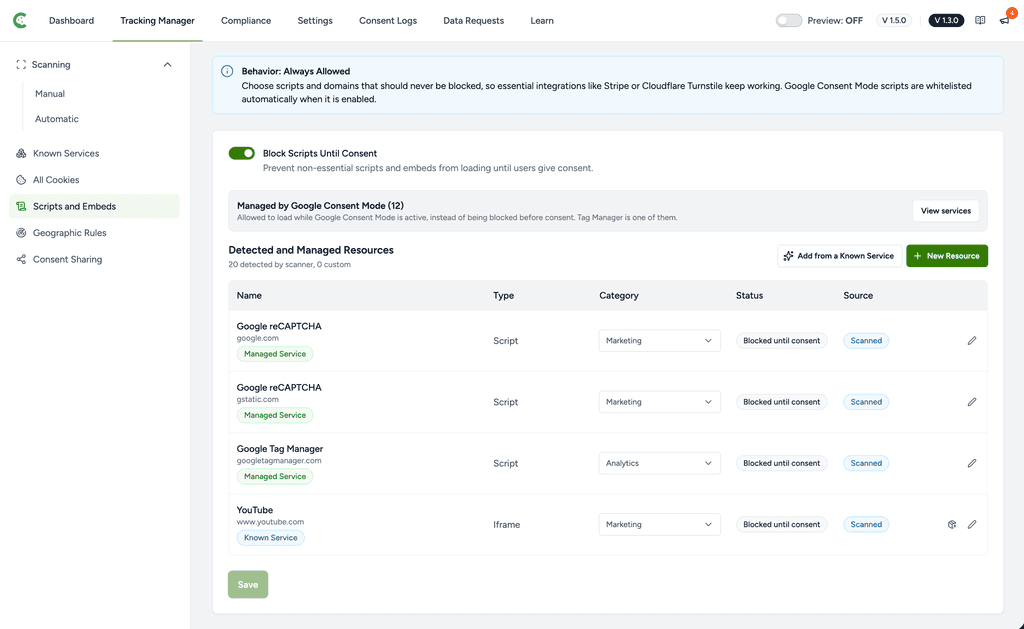
- Go to SureCookie → Tracking Manager → Scripts and Embeds.
- Make sure Block Scripts Until Consent is on.
- In Detected and Managed Resources list, find the embed by its service name or domain (Type: Iframe) and read its Category.
- Note: the Category column cannot show you a Compliance Guard hold. A held domain keeps its ordinary category in this table, so the row still reads Marketing while no consent can release it. If the visitor accepted that category and the embed is still blocked, read “The Domain Is Held by Compliance Guard” below.
Test With a Fresh Consent Choice
Your browser remembers your earlier choice, so you may be looking at an old “declined” state.
- Open your site in a private or incognito window and accept the category the embed needs.
- Or reopen your cookie preferences and accept that category.
The embed should appear immediately after you accept. A reload isn’t required, but it doesn’t hurt.
Clear Your Caches
A page cache or CDN can keep serving the pre-consent version of the page, placeholder and all, even after consent is given.
- Clear your WordPress page cache and purge your CDN.
- Reload and accept again in a private window.
The Embed Isn’t in the Detected List
If the embed’s service isn’t listed under Detected and Managed Resources, SureCookie may not be gating it the way you expect.
- Run a scan under SureCookie → Tracking Manager → Scanning → Manual that includes the page with the embed, so the resource is detected and categorized.
- Return to Block Scripts Until Consent and confirm the embed now appears with a category.
The Embed Loads via a Separate Script
Some embeds are injected by a loader script rather than a plain iframe. If accepting the iframe’s category doesn’t help, check whether a related entry with Type Script (for example a tag manager) sits in a different category that the visitor also needs to accept.
The Domain Is Held by Compliance Guard
Compliance Guard is a SureCookie Pro feature that blocks a newly detected tracker domain until an administrator reviews it. It is on by default, and it holds nothing unless Enable Automatic Scanning is on as well. If you run the free plugin, or you never turned automatic scanning on, this cause does not apply to your site.
A held domain sits outside every consent category. Accepting Marketing, accepting everything, or switching consent model will not release it, because there is no category left for the visitor to accept. YouTube, Vimeo and Google Maps can all be held this way: our catalog lists all three as Marketing. Only a service our catalog lists as Essential or Functional is never held.
The placeholder tells you which case you are in. A normally blocked embed offers an Accept & Load button. An embed on a held domain shows the line “This content is currently blocked.” and no button at all, because there is no consent that would load it.
Note: the same button-less placeholder appears when the embed’s category is hidden from your banner. Check Hide Unused Categories under SureCookie > Tracking Manager > All Cookies > Manage Categories before you assume a hold.
Release the Domain
Releasing hands the domain back to your normal consent rules. Only an administrator can do it.
- Go to SureCookie > Tracking Manager > Scanning > Automatic.
- Scroll below the Last Scan card to the Blocked Until Reviewed card. It shows only while Enable Automatic Scanning is on and at least one domain is held, so if it is not on the screen, nothing is being held.
- Click Review.
- Find the embed’s domain and read the line under it. Consent-gated after release means another rule still covers the domain, so it will wait for consent in the normal way. Nothing else blocks this domain means the opposite: release it and it loads for everyone, before consent.
- Click Release. Where the release would also drop a broader held domain, or leave nothing blocking this one, the button becomes Confirm Release and needs a second click.
Release one domain at a time. Each domain is its own decision, so there is no bulk release. Afterwards, clear your caches as described above and reload the page.
Important: update to SureCookie 1.5.0 and SureCookie Premium 1.3.0 or later before you work through this section. Earlier versions treated everything the first automatic scan found as new and held every third-party domain at once, and a domain you released could come back on the next scan.
Still Blocked?
If the embed still won’t load, contact support with the details so we can investigate.
- The embed’s service and URL.
- The category it’s listed under in Detected Resources.
- Whether Blocked Until Reviewed under SureCookie > Tracking Manager > Scanning > Automatic lists the embed’s domain.
- Whether you tested in a private window after accepting that category.
- Your caching and CDN setup.
We don't respond to the article feedback, we use it to improve our support content.