
- SureCookie Installation Guide
- Installing SureCookie Pro
- Updating SureCookie
- How to Set Up SureCookie: Onboarding Wizard Guide
- SureCookie Dashboard Overview
- Connecting Your Site to SureCookie (Scanner Setup)
- Using SureCookie on Multiple Sites
- Uninstalling SureCookie & Data Cleanup
- SureCookie Shortcodes Reference
- Preferences Settings (Menu, Branding, Analytics)
- Customizing Banner Content
- Customizing Banner Layout
- Custom CSS for Banner Styling
- How to Configure the Floating Widget
- Customizing the Preference Modal
- Controlling Where the Cookie Banner Appears
- Customizing Banner Colors (Custom Colors, WCAG)
- Customizing the Blocked Content UI
- Banner Text in the Wrong Language (WPML, Polylang, and Locales)
- Re-Consent
- Understanding SureCookie Logs
- How to Set Up Geographic Targeting
- Block Scripts Until Consent (Resource Blocking)
- Setting Up Google Consent Mode v2
- Consent Models Explained (Opt-in vs Opt-out)
- Exporting Consent Logs (PDF Proof + CSV)
- Consent & Data Settings (Duration, Retention, Renew)
- Consent Forwarding Across a Multisite Network
- Resource / Script Blocking (Add Embeds + Fixes)
- Troubleshooting SureCookie
- Fix a Stuck or Failed Cookie Scan
- Why Some Cookies Aren’t Detected
- Banner Not Appearing: Troubleshooting
- Settings or Cookie Categories Not Saving or Loading
- Embeds Blocked After Consent (YouTube, Maps, Vimeo)
- Site Performance / Page Speed
- Scanning Your Site From Your Browser
- Importing and Exporting SureCookie Settings
- Verifying Your Domain With a DNS Record
- Why reCAPTCHA Is Blocked, and How to Release It
- Is SureCookie a Google-Certified CMP?
- Where Banner and Widget Settings Live, and Which One Wins
- Why Trackers Still Fire Before Consent
- Is SureCookie GDPR Compliant? (Overview)
- Whitelisting the SureCookie Scanner
- Excluding the SureCookie Banner from LiteSpeed Cache
SureCookie & Site Performance / Page Speed
Every consent plugin adds some work to your pages, because the banner has to load for every visitor who has not answered yet. SureCookie adds a stylesheet and a script chain, and on a phone the banner itself can become the element PageSpeed Insights measures for loading speed. It can also take weight away: with blocking on, most trackers wait for consent, so a first visit downloads less third-party code.
When PageSpeed Names the Banner as Your LCP Element
Largest Contentful Paint (LCP) is the time until the largest piece of content on the visible screen appears. It is one of Google’s Core Web Vitals.
SureCookie draws the banner with JavaScript once its scripts have loaded, after the rest of the page. That makes the banner one of the last things to appear. On a phone, a long Banner Message wraps onto several lines and can become the largest text block on screen. Lighthouse then times LCP from the moment the banner appears, not from your own content.
To check whether this is happening:
- Open PageSpeed Insights and test your page on Mobile.
- Find the element the report names for Largest Contentful Paint.
- Check whether that element is your banner message. If it is, shorten the message as described below.
Shorten the Banner Message
Keep the message to about two lines on a phone. Aim for the line count, not a character count, because wrapping is what LCP sees.
- Go to SureCookie → Settings → Banner → Content.
- Open the Consent Banner tab and shorten the Banner Message.
- Click Save.
- Clear your host’s page cache and your CDN if you use them, then run the Mobile test again.
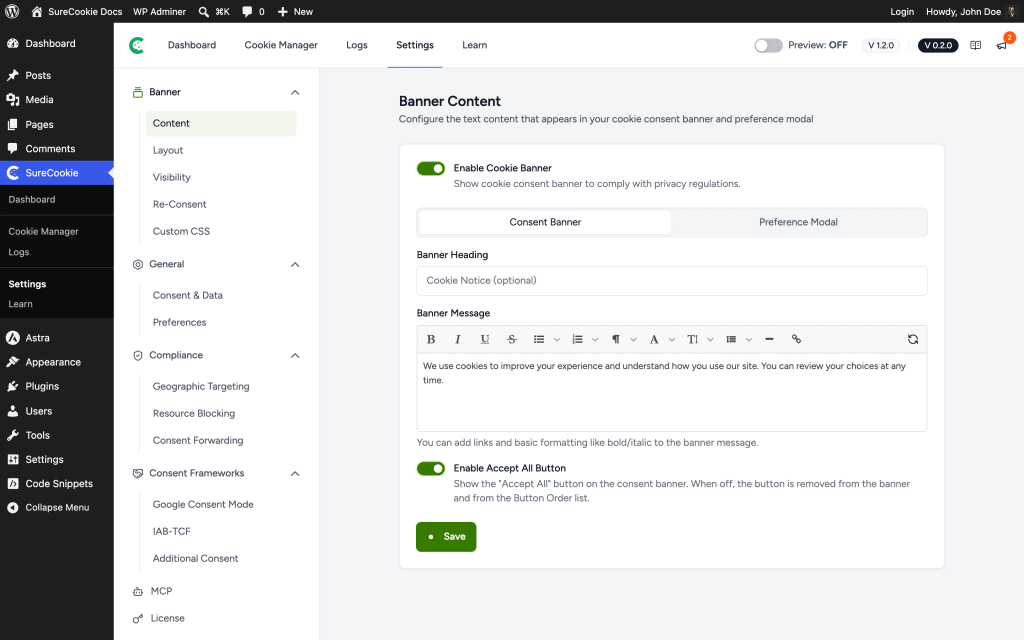
The default message runs to three lines at common phone widths, so shorten it even if you never edited it.
Note: On a multilingual site, an edited message is no longer translated for you. Translate it for every language, as described in How to Translate Your Settings in Banner Text in the Wrong Language (WPML, Polylang, and Locales).
With Geographic Rules (SureCookie Pro), a visitor covered by a rule sees that rule’s message. Turn on Use Custom Configuration for the rule and shorten its message too. See How to Set Up Geographic Targeting.
This changes which element LCP is measured on, not when the banner appears. The banner still draws at the same moment, and LCP moves back to your page’s own content.
For the other fields on this screen, see Customizing Banner Content.
What SureCookie Loads for Visitors
These load on front-end pages while the banner is on, including for visitors who have already answered, because the banner script is what reads a saved choice.
- Banner stylesheet – One stylesheet in
<head>, about 8 KB compressed. It is a normal render-blocking link on purpose. A cache plugin can drop a stylesheet that loads the non-blocking way, which leaves the banner unstyled. - Banner script chain – The banner script plus the WordPress core scripts it builds on (React and WordPress’s element, hooks and translation scripts), about 75 KB compressed in total. It loads at the bottom of the page and most of it is deferred. If your theme or another plugin already loads WordPress’s React, those files are shared. There is no jQuery.
- Banner settings – Your banner text, categories and cookie list, printed inline with the banner script. This block grows as your cookie list grows.
- Figtree font – The banner uses its own Figtree font, served from your site, at about 16 KB per weight. The browser fetches only the weights the banner draws, and shows text in a fallback font until they arrive.
- Blocking guard – When Block Scripts Until Consent is on, a small inline script sits at the very top of
<head>. It catches trackers that page builders and tag managers add in the browser, so it has to run before any of them. - Google Consent Mode defaults – When Google Consent Mode is on, a short inline script in
<head>sets Google’s consent defaults before any Google tag runs. - SureCookie Pro extras – With SureCookie Pro, the floating widget adds a small script and stylesheet when it is turned on. See How to Configure the Floating Widget. Geographic Rules set to Show only where required by law add a script that looks up the visitor’s region once per browser tab. See How to Set Up Geographic Targeting.
The SureCookie dashboard’s own scripts do not load for visitors. On pages that are not served from a page cache, blocking also rewrites the HTML before it is sent, which adds a little server time.
When the Banner Is Turned Off
Turning off Enable Cookie Banner stops blocking and the guard, but not every file:
- The banner script and stylesheet still load on every page while a menu is picked under Menu Level or Enable Floating Widget (SureCookie Pro) is on, and on pages whose content contains the re-consent shortcode. See Re-Consent and the re-consent items in the Troubleshooting section of SureCookie Shortcodes Reference.
- The Google Consent Mode script still loads while Consent Mode is on.
- Pages that show your cookie policy load its small stylesheet. With SureCookie Pro, pages with a data request form also load that form’s script and stylesheet.
Where Blocking Helps Performance
Third-party trackers are among the heaviest things on a page. Tag managers, ad pixels and embeds such as YouTube each pull in their own scripts. With Block Scripts Until Consent on and the opt-in model, blocked trackers do not download until the visitor consents.
PageSpeed Insights and Lighthouse test as a first-time visitor who has not answered, so blocking is active in what they measure and blocked trackers are left out of the report.
Google tags are the exception. With Google Consent Mode on, SureCookie deliberately lets Google tags such as Tag Manager, Analytics and Ads load before consent in denied mode, so Google can adjust what they collect. They still download before consent, so they stay in Lighthouse’s numbers. See Why Trackers Still Fire Before Consent and Setting Up Google Consent Mode v2.
Caching and Optimization Plugins
Since version 1.4.0, SureCookie keeps its own files out of the optimizer features that break a consent banner. For the plugins it covers, see What SureCookie Handles Automatically in Compatibility: Caching Plugins & Page Builders. You only need to add exclusions by hand when a feature slips past these, as described in What You Still Check by Hand in the same doc.
Never delay the banner script until user interaction. A consent banner has to run on page load to do its job.
- For LiteSpeed’s exclusion boxes, see Excluding the SureCookie Banner from LiteSpeed Cache.
- For page caches, CDNs and the full list of covered plugins, see Compatibility: Caching Plugins & Page Builders.
- If you use SureCookie Pro Geographic Rules with a full-page cache, read the Known Limitations section of Why Trackers Still Fire Before Consent.
Troubleshooting
- Scores dropped after you added trackers – The trackers carry the weight, not the banner. Keep only the services you need, and keep them blocked until consent. See Block Scripts Until Consent (Resource Blocking).
- The banner stopped appearing after you turned on an optimization feature – Follow What You Still Check by Hand in Compatibility: Caching Plugins & Page Builders.
- A speed or privacy scanner lists tracker addresses in your page source – When blocking is on, the guard at the top of
<head>carries the list of addresses SureCookie watches for. They are patterns it matches against, not connections your page makes. Check the Network tab in your browser’s developer tools to see what actually loads.
Next Steps
Start with the banner message, then retest on mobile. To review what is held back before consent, see Block Scripts Until Consent (Resource Blocking).
We don't respond to the article feedback, we use it to improve our support content.