
- SureCookie Installation Guide
- Installing SureCookie Pro
- Updating SureCookie
- How to Set Up SureCookie: Onboarding Wizard Guide
- SureCookie Dashboard Overview
- Connecting Your Site to SureCookie (Scanner Setup)
- Using SureCookie on Multiple Sites
- Uninstalling SureCookie & Data Cleanup
- Preferences Settings (Menu, Branding, Analytics)
- Customizing Banner Content
- Customizing Banner Layout
- Custom CSS for Banner Styling
- How to Configure the Floating Widget
- Customizing the Preference Modal
- Controlling Where the Cookie Banner Appears
- Customizing Banner Colors (Custom Colors, WCAG)
- Customizing the Blocked Content UI
- Banner Text in the Wrong Language (WPML, Polylang, and Locales)
- Re-Consent
- Understanding SureCookie Logs
- How to Set Up Geographic Targeting
- Block Scripts Until Consent (Resource Blocking)
- Setting Up Google Consent Mode v2
- Consent Models Explained (Opt-in vs Opt-out)
- Exporting Consent Logs (PDF Proof + CSV)
- Consent & Data Settings (Duration, Retention, Renew)
- Consent Forwarding Across a Multisite Network
- Resource / Script Blocking (Add Embeds + Fixes)
- Troubleshooting SureCookie
- Fix a Stuck or Failed Cookie Scan
- Why Some Cookies Aren’t Detected
- Banner Not Appearing: Troubleshooting
- Settings or Cookie Categories Not Saving or Loading
- Embeds Blocked After Consent (YouTube, Maps, Vimeo)
- Scanning Your Site From Your Browser
- Importing and Exporting SureCookie Settings
- Verifying Your Domain With a DNS Record
- Why reCAPTCHA Is Blocked, and How to Release It
Banner Text in the Wrong Language (WPML, Polylang, and Locales)
On a multilingual site the banner can show three languages at once: your heading in one, your buttons in another, some labels still in English. Nothing is broken. SureCookie’s text comes from two places, each translated a different way. This article draws that line, then covers the common cases.
Before you begin: WPML and Polylang support is in the free plugin, and SureCookie registers its strings only while one of them is active.
The One Distinction That Explains Most Reports
Every piece of SureCookie text is either a setting or a bundled string.
- Settings are values stored once in your database, in the language you typed them. SureCookie registers them for you. Translate them under the group SureCookie in WPML > String Translation, or Languages > Strings translations in Polylang.
- Bundled strings are fixed labels built into the plugin. They follow the WordPress locale of the page the visitor is on, and never appear on the String Translation screen. That is by design.
The settings SureCookie registers:
| Setting | Where You Edit It |
|---|---|
| Banner heading and banner message | SureCookie > Settings > Banner > Content |
| Preference modal title and description | SureCookie > Settings > Banner > Content, Preference Modal tab |
| Re-consent button label | SureCookie > Settings > Banner > Re-Consent |
| Blocked-content placeholder text and button text | SureCookie > Settings > Advanced > Blocked Content UI |
| Partner sites notice (Pro) | SureCookie > Tracking Manager > Consent Sharing |
| Cookie category names and descriptions | SureCookie > Tracking Manager > All Cookies, then Manage Categories |
| The four banner button labels | No field in SureCookie’s settings, but still translatable. See Case 2. |
Everything else is bundled text that follows the WordPress locale and never appears on the String Translation screen: Always Active, Reject All, Confirm My Choices, Powered by and the cookie table headings.
Case 1: You Translated Everything and Some Text Is Still English
Issue. Every row under SureCookie is translated. The heading and message switch language; text inside the preferences modal does not.
Cause. You translated every setting there is. The rest is bundled text and follows each language’s WordPress locale, so it never appears on the String Translation screen.
Fix. Check the locale each language maps to. WPML > Languages shows a WordPress locale column; Polylang shows a Locale field. Against the list below, a regional locale is Case 3 and a missing one is Case 4.
Case 2: A Banner Button Label Will Not Translate
Issue. Accept All, Only Essential, Decline and Preferences stay in one language, and there is no field for them anywhere in SureCookie’s settings.
Cause. Two separate things are true, and mixing them up is what makes this confusing. SureCookie has no setting for these four labels, so you cannot reword them on any settings screen. They are still registered for translation, because registration uses each setting’s current value and these carry a built-in default.
Fix. Translate them in String Translation like any other row. Look under the SureCookie group for the rows holding the English defaults Only Essential, Accept All, Decline and Preferences, and enter your wording per language.
Note: the Re-Consent button label behaves the same way in String Translation, and it does also have a field at SureCookie > Settings > Banner > Re-Consent if you want to change the wording itself.
Case 3: Your Site Uses a Regional Locale Such as de_CH or fr_BE
Issue. One language shows raw English while the others are fine, and its locale is a regional variant: Swiss German (de_CH), Belgian French (fr_BE), Mexican Spanish (es_MX) or similar.
Cause. WordPress loads a plugin translation by exact locale match. There is no de_CH file, so nothing loads and that language falls back to English.
Fix. Update to SureCookie 1.5.0 or later. From that release a regional variant inherits the bundled translation of its base language, so de_CH gets the German catalogue and fr_BE the French one, for SureCookie Pro’s text too. English and Chinese variants are excluded: a Traditional Chinese reader is not served by a Simplified Chinese catalogue. A real regional file you add always wins.
Case 4: Your Language Is Not One of the Bundled Locales
Issue. An entire language, such as Ukrainian, Romanian or Persian, is English everywhere.
Cause. SureCookie ships a fixed set of locales. Anything outside it has no catalogue.
Fix. Add it yourself with Loco Translate.
- Go to Loco Translate > Plugins and open SureCookie.
- Click New language and select your language.
- For the file location, choose System, which writes to
wp-content/languages/plugins/. - Translate the strings and click Save.
Choosing System matters: a file inside the plugin folder is erased on the next update.
Important: The banner is a JavaScript application, so its labels come from .json files, not the .mo file. Loco Translate writes both; compile a .po by hand and the banner stays English.
To have a language bundled, contact support with the locale you need. Danish arrived that way.
Case 5: You Translated a File and Nothing Changed
Issue. You wrote a complete translation, saved it, reloaded the site, and nothing moved.
Cause. SureCookie and SureCookie Pro are separate plugins with separate text domains, surecookie and surecookie-pro. A translation of one never reaches the other, and Loco Translate lists them under near-identical names.
Fix. Find which plugin owns the text, then translate that one.
- SureCookie (
surecookie) – banner heading and message, button labels, preferences modal, category names, blocked-content placeholders. - SureCookie Pro (
surecookie-pro) – geographic rule wording, consent sharing, the data request form and its emails.
Case 6: Cookie Category Names Will Not Translate
Issue. Essential Cookies, Analytics Cookies and the rest keep one language everywhere, and editing them in String Translation changes nothing.
Cause. SureCookie registers the value stored in your settings. Until you edit a category nothing of yours is stored, and the bundled default you see already shifts with the language, so there is no stable value to attach a translation to.
Fix. Store a value, even an identical one.
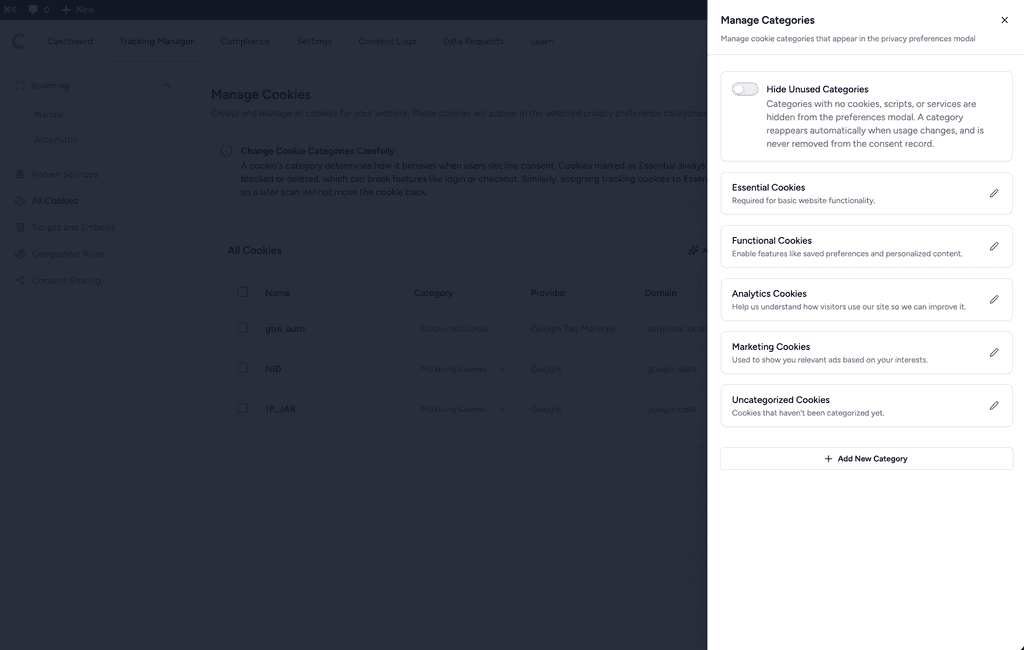
- Go to SureCookie > Tracking Manager > All Cookies.
- Click Manage Categories.
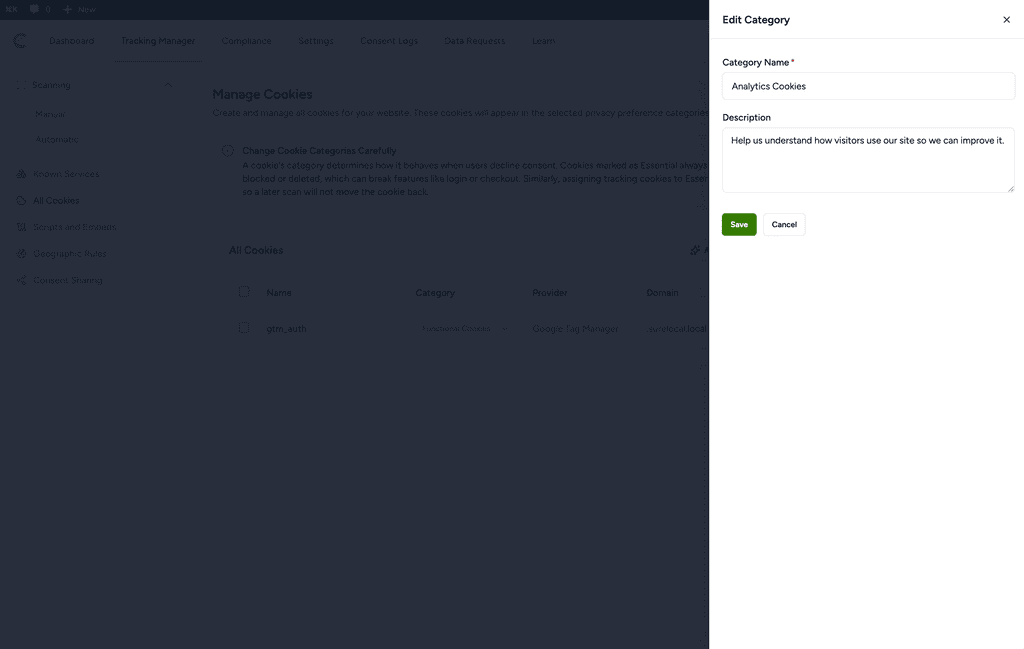
- Edit each category and click Save, keeping the same wording.
- Reload the String Translation screen and translate the new rows.
If every language on your site is bundled, skip this: the default names are already translated.
Case 7: The Data Request Form and Its Emails Are in English
Issue. Your banner is fully translated, but the data request form, its emails and its error messages are English.
Cause. Those strings belong to SureCookie Pro, so no free-plugin translation file reaches them, and Pro 1.2.0 never loaded its own. They existed but were never read.
Fix. Update to SureCookie Pro 1.3.0 or later.
Languages That Ship With SureCookie
The free plugin and SureCookie Pro ship the same 20 locales:
ar, cs_CZ, da_DK, de_DE, el, es_ES, fr_FR, he_IL, id_ID, it_IT, ja, nl_NL, pl_PL, pt_BR, ru_RU, sv_SE, th, tr_TR, vi, zh_CN
We ship and update them with the plugin, so there is nothing to install. If your language is listed and still shows English, check the locale: Case 3.
Known Limitations
Two gaps are open, with no workaround worth recommending.
- When a geographic rule matches a visitor, the rule’s own description replaces the global banner message, including the translation you made for it. That description is not registered for String Translation and cannot be translated per language.
- A rule’s custom message holds one value for the whole site.
See How to Set Up Geographic Targeting.
Next Steps
Set your text first, then translate it: Customizing Banner Content, Manage Cookie Categories, Customizing the Blocked Content UI, Re-Consent. If the banner is missing rather than mistranslated, see Banner Not Appearing: Troubleshooting. For Pro: Installing SureCookie Pro and Handling Data Requests.
We don't respond to the article feedback, we use it to improve our support content.