
- SureCookie Installation Guide
- Installing SureCookie Pro
- Updating SureCookie
- How to Set Up SureCookie: Onboarding Wizard Guide
- SureCookie Dashboard Overview
- Connecting Your Site to SureCookie (Scanner Setup)
- Using SureCookie on Multiple Sites
- Uninstalling SureCookie & Data Cleanup
- Preferences Settings (Menu, Branding, Analytics)
- Customizing Banner Content
- Customizing Banner Layout
- Custom CSS for Banner Styling
- How to Configure the Floating Widget
- Customizing the Preference Modal
- Controlling Where the Cookie Banner Appears
- Customizing Banner Colors (Custom Colors, WCAG)
- Customizing the Blocked Content UI
- Banner Text in the Wrong Language (WPML, Polylang, and Locales)
- Re-Consent
- Understanding SureCookie Logs
- How to Set Up Geographic Targeting
- Block Scripts Until Consent (Resource Blocking)
- Setting Up Google Consent Mode v2
- Consent Models Explained (Opt-in vs Opt-out)
- Exporting Consent Logs (PDF Proof + CSV)
- Consent & Data Settings (Duration, Retention, Renew)
- Consent Forwarding Across a Multisite Network
- Resource / Script Blocking (Add Embeds + Fixes)
- Troubleshooting SureCookie
- Fix a Stuck or Failed Cookie Scan
- Why Some Cookies Aren’t Detected
- Banner Not Appearing: Troubleshooting
- Settings or Cookie Categories Not Saving or Loading
- Embeds Blocked After Consent (YouTube, Maps, Vimeo)
- Scanning Your Site From Your Browser
- Importing and Exporting SureCookie Settings
- Verifying Your Domain With a DNS Record
- Why reCAPTCHA Is Blocked, and How to Release It
- Is SureCookie a Google-Certified CMP?
- Where Banner and Widget Settings Live, and Which One Wins
- Why Trackers Still Fire Before Consent
- Is SureCookie GDPR Compliant? (Overview)
- Whitelisting the SureCookie Scanner
- Excluding the SureCookie Banner from LiteSpeed Cache
Is SureCookie a Google-Certified CMP?
No. SureCookie is not on Google’s certified CMP list, it holds no registered CMP ID, and it does not implement the IAB Transparency and Consent Framework (TCF) in either the free plugin or SureCookie Pro.
For most sites running SureCookie, that answer does not change anything, because Google has two different consent requirements and people routinely mix them up. Certification is a publisher rule. Consent Mode v2 signals are what an advertiser owes Google, and SureCookie sends all of them.
This page explains which requirement applies to you. For the settings themselves, see Setting Up Google Consent Mode v2.
The Two Requirements Are Not the Same Thing
| Requirement | Who it applies to | What Google asks for | SureCookie |
|---|---|---|---|
| Google-certified CMP | Publishers serving ads through AdSense, Ad Manager or AdMob to visitors in the EEA, the UK or Switzerland | A CMP from Google’s certified list, integrated with IAB TCF | Not supported |
| Consent Mode v2 signals | Site owners running Google tags on their own site: Google Ads, Google Analytics 4, Google Tag Manager | Each visitor’s consent passed to Google’s tags as consent signals | Supported, in the free plugin |
Google’s own certification page is titled “Google consent management requirements for serving ads in the EEA, the UK, and Switzerland (for publishers)”. It became a requirement for the EEA and UK on 16 January 2024, and for Switzerland on 31 July 2024. Traffic without a certified CMP is still eligible for non-personalized and limited ads, not personalized ones. That page points advertisers elsewhere, which is the clearest sign that the two audiences are governed by different rules.
How to Tell Which One Applies to You
Ask one question: do you sell ad space, or do you buy ads?
- You sell ad space. Your pages carry AdSense, Ad Manager or AdMob units and Google pays you for impressions. You are a publisher, and the certified CMP rule applies to those pages.
- You buy ads or measure your own site. You run Google Ads campaigns, GA4, or a Tag Manager container, and Google is a cost, not a revenue line. You are an advertiser, and CMP certification is not asked of you.
Most SureCookie sites fall in the second group. If you are unsure, open your site’s source and look for an AdSense or Ad Manager ad unit. If there is none, you are an advertiser.
“Google Says an Uncertified CMP Makes My Google Ads Metrics Inaccurate”
That warning comes from the publisher rule, and it is about the ads a publisher shows on their own pages. It does not say that an advertiser’s Google Ads reporting degrades because their banner plugin is uncertified.
What does affect your reporting as an advertiser is whether consent reaches Google’s tags at all. A banner that blocks Google Ads and never tells Google what the visitor chose leaves you with gaps and no modeling. That is the job Consent Mode v2 does, and SureCookie does it.
What SureCookie Actually Sends
SureCookie writes a gtag('consent', 'default', ...) block at the top of the page before any Google tag runs, then updates it the moment the visitor answers the banner. Seven signals are covered:
- Marketing drives
ad_storage,ad_user_data,ad_personalizationandpersonalization_storage. - Analytics drives
analytics_storage. - Functional drives
functionality_storage. - Essential drives
security_storage, which is always granted.
Two further points that come up often:
- Advanced, not Basic. Google’s tags are allowed to load with a denied default so they can send cookieless pings, rather than being withheld until consent. That is Advanced Consent Mode.
ads_data_redactionandurl_passthroughare always on. Both are sent astrueon every page and there is no setting for either. They are the privacy-preserving side of Consent Mode, so SureCookie does not offer a way to switch them off.
Before a visitor chooses anything, SureCookie ships an all-denied default plus a regional rule denying everything for the EU. You can widen the worldwide default under SureCookie > Settings > Consent Frameworks > Google Consent Mode, but granting a category there tells Google the visitor consented before they were asked.
Important: Consent Mode is a signal, not a block. It tells Google what to do with data; it does not stop a non-Google tracker from loading. Keep Resource / Script Blocking on for that.
Do You Need Pro for This?
No. Google Consent Mode v2 is entirely in the free plugin, and SureCookie Pro adds nothing to it. Do not buy a licence expecting extra Consent Mode features.
If You Run AdSense in the EEA Today
SureCookie cannot satisfy the certified CMP requirement for those pages, and no setting changes that. Pick a CMP from the certified list on Google’s publisher requirements page, which Google updates weekly. Several entries on that list are WordPress plugins, so the common assumption that no WordPress CMP is certified is not correct.
You can still run SureCookie on your sites that do not serve AdSense, Ad Manager or AdMob inventory. Splitting a portfolio that way is a normal outcome.
About the “Coming Soon” Labels
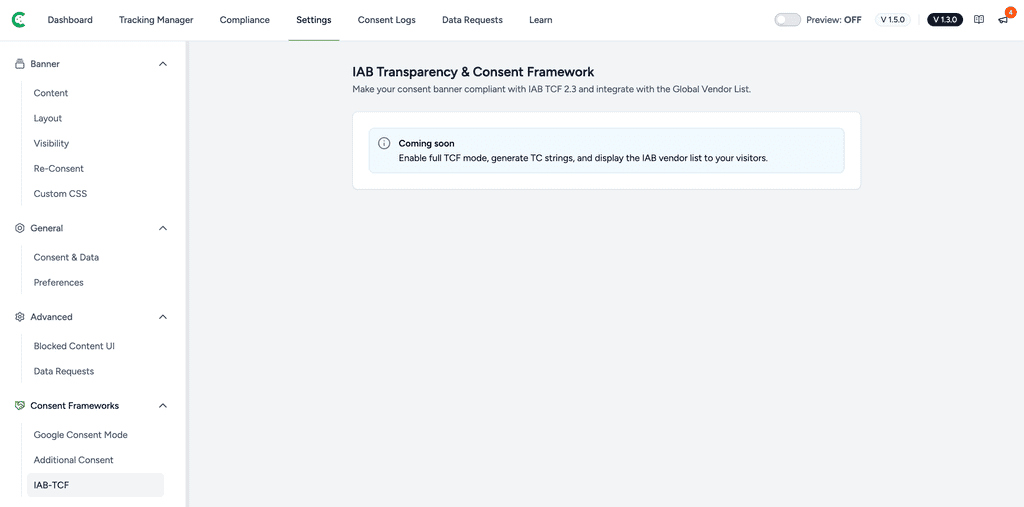
Our pricing page lists “IABTCF compliance” and “Microsoft Consent Mode” as Coming Soon, the Pro and Business tiers list “Advanced Consent Frameworks” the same way, and the IAB-TCF and Additional Consent screens under SureCookie > Settings > Consent Frameworks are placeholders. The “IAB TCF (Soon)” line in Is SureCookie GDPR Compliant? is the same label.
Read those as a roadmap, not a commitment. None of it is built today, none of it ships in any plan you can buy right now, and we will not name a release date. If your project depends on TCF or a registered CMP ID, plan around a certified CMP.
Microsoft Clarity and Microsoft UET
SureCookie sends no consent signal to Microsoft Clarity or Microsoft UET today. Their tags are blocked until the visitor consents, and then released, but Clarity’s own consent API is never called.
This matters for European traffic. Since 31 October 2025, Clarity enforces a consent signal for visits from the EEA, the UK and Switzerland, and a session without one loses full functionality. Clarity currently integrates with a small set of CMPs, and SureCookie is not one of them.
Treat this as a current limitation rather than a configuration problem. There is no setting that fixes it.
Why GA4 Still Loads Before Consent
This is Advanced Consent Mode working as designed. When Google Consent Mode is enabled, SureCookie deliberately lets GCM-compatible Google services load so they can receive the consent state, instead of holding them back. Under SureCookie > Tracking Manager > Scripts and Embeds those services carry a Managed by GCM badge rather than being blocked.
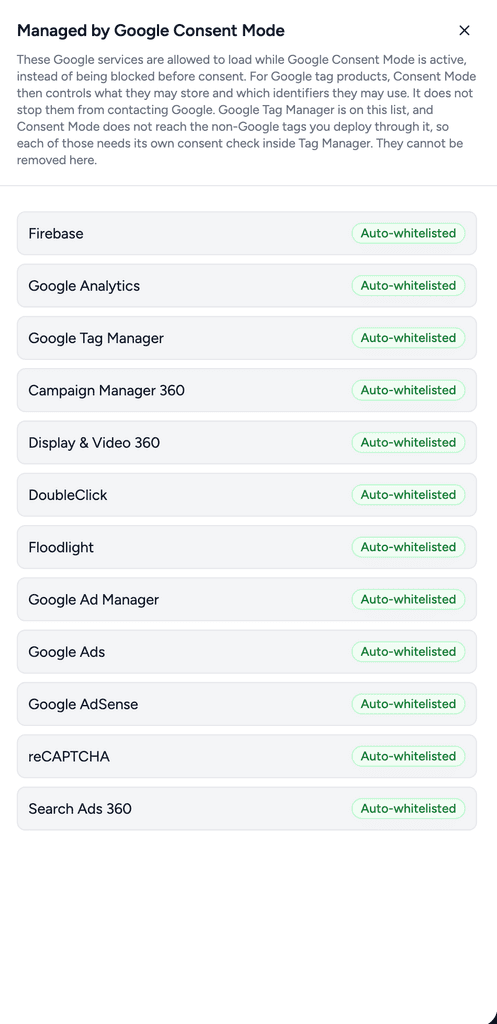
Everything else on your site is still blocked by category. See Resource / Script Blocking for how that works and Using Known Services for how a service gets its category.
Next Steps
To turn Consent Mode on, set the wait time and verify the signals in Google Tag Assistant or GA4 DebugView, follow Setting Up Google Consent Mode v2. To decide what happens before a visitor answers in each region, see Consent Models Explained (Opt-in vs Opt-out), How to Set Up Geographic Targeting and CCPA / CPRA Compliance.
We don't respond to the article feedback, we use it to improve our support content.