
- SureCookie Installation Guide
- Installing SureCookie Pro
- Updating SureCookie
- How to Set Up SureCookie: Onboarding Wizard Guide
- SureCookie Dashboard Overview
- Connecting Your Site to SureCookie (Scanner Setup)
- Using SureCookie on Multiple Sites
- Uninstalling SureCookie & Data Cleanup
- Preferences Settings (Menu, Branding, Analytics)
- Customizing Banner Content
- Customizing Banner Layout
- Custom CSS for Banner Styling
- How to Configure the Floating Widget
- Customizing the Preference Modal
- Controlling Where the Cookie Banner Appears
- Customizing Banner Colors (Custom Colors, WCAG)
- Customizing the Blocked Content UI
- Banner Text in the Wrong Language (WPML, Polylang, and Locales)
- Re-Consent
- Understanding SureCookie Logs
- How to Set Up Geographic Targeting
- Block Scripts Until Consent (Resource Blocking)
- Setting Up Google Consent Mode v2
- Consent Models Explained (Opt-in vs Opt-out)
- Exporting Consent Logs (PDF Proof + CSV)
- Consent & Data Settings (Duration, Retention, Renew)
- Consent Forwarding Across a Multisite Network
- Resource / Script Blocking (Add Embeds + Fixes)
- CCPA / CPRA Compliance with SureCookie
- Handling Data Requests
- Setting Up Your Business Details
- Generating a Privacy Policy Page
- Recording Consent Without Storing Visitor IP Addresses
- Generating a Cookie Policy Page
- Troubleshooting SureCookie
- Fix a Stuck or Failed Cookie Scan
- Why Some Cookies Aren’t Detected
- Banner Not Appearing: Troubleshooting
- Settings or Cookie Categories Not Saving or Loading
- Embeds Blocked After Consent (YouTube, Maps, Vimeo)
- Scanning Your Site From Your Browser
- Importing and Exporting SureCookie Settings
- Verifying Your Domain With a DNS Record
- Why reCAPTCHA Is Blocked, and How to Release It
Recording Consent Without Storing Visitor IP Addresses
Requires: SureCookie 1.5.0 or higher:
SureCookie writes a consent log entry every time a visitor makes a choice, so you can demonstrate later that consent was given. By default that entry includes a partial IP address and the visitor’s country.
Some site owners would rather hold no visitor address at all. This is a common requirement in Germany, where an IP address is treated as personal data and site owners often want proof of consent without keeping anything that identifies the visitor. A one-line filter switches IP handling off for consent records: no address, country or region is stored, and the consent record itself is still written, so your proof of consent survives.
This filter is available from SureCookie 1.5.0. It is code-only, so there is no equivalent toggle in the settings screens.
What SureCookie Records by Default
With Enable Consent Logging turned on under SureCookie → General → Consent & Data, each entry holds four things you can see on the SureCookie → Consent Logs screen:
- Date & Time – when the choice was made.
- IP Address – partial, never the full address. SureCookie passes it through WordPress’s own
wp_privacy_anonymize_ip(), which zeroes the last block, so123.4.567.89is stored as123.4.567.0. - Country – resolved from the address, so the rules that applied to that visitor are recorded alongside their decision.
- Status – the choice itself, backed by the per-category preferences behind it.
To resolve the country and region, SureCookie sends the full address to library.surecookie.com. Only the country and region come back, and the full address is never written to your database. That transmission is the part most people want stopped.
What the Filter Changes
| Default | With the filter on | |
|---|---|---|
| Stored IP address | Partial, last block zeroed | Not stored |
| Stored country | Country name | Not stored |
| Stored region | Region name | Not stored |
| Address sent when consent is saved | Full address, never stored | Nothing sent |
| Consent record written | Yes | Yes |
The last row is the important one. The record is still created, so this reduces what you hold about a visitor without costing you the ability to show that they consented.
Important: The “nothing sent” row applies to the free plugin, and to SureCookie Pro with Geographic Targeting set to apply worldwide. If you target specific regions, read the Geographic Targeting section below before relying on it.
Step 1: Add the Filter
Add this to your child theme’s functions.php, or to a code snippets plugin:
add_filter( 'surecookie_skip_consent_logs_ips', '__return_true' );That is the whole change. There is nothing to configure.
Important: Use a child theme rather than the parent theme. A theme update overwrites the parent theme’s functions.php and would silently remove the filter, putting IP capture back on without telling you.
Step 2: Confirm It Took Effect
The consent log screen adapts rather than showing you a table of empty values, so the change is easy to see.
- Open your site in a private browsing window and make a consent choice.
- Go to SureCookie → Consent Logs.
- Confirm the IP Address and Country columns are no longer in the table. The Country filter is also gone, and the search box now reads Session ID… instead of IP address or Session ID….
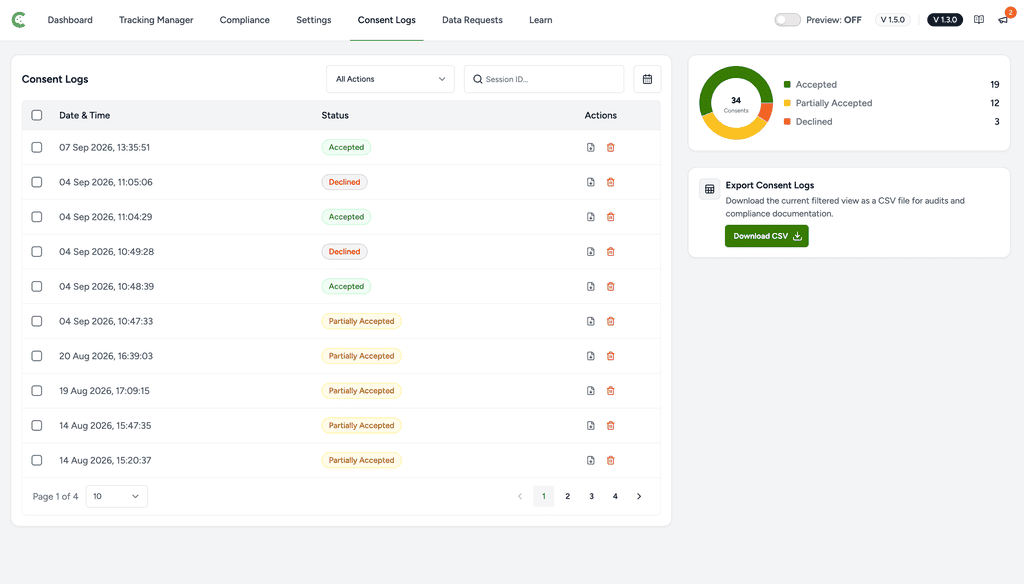
If those columns are still present, the filter is not loading. See Troubleshooting below.
What You Still Have as Proof of Consent
GDPR Article 7(1) requires you to be able to demonstrate that a visitor consented. It does not require an IP address. With the filter on, every record still carries:
- The session identifier that ties the decision to one visitor, generated randomly in the browser and unrelated to the address.
- The timestamp of the decision, generated on your server in UTC.
- The action taken: accepted, declined, or partially accepted.
- The per-category preferences exactly as the visitor set them.
- The user account ID, if the visitor was signed in.
Records are keyed by session and timestamp rather than by address, so redacting the address does not merge visitors together or cause records to be dropped. CSV exports, PDF proof exports, consent forwarding and the WordPress personal data exporter all read the same redacted values, so there is no export where the address reappears.
If You Use Geographic Targeting
Important: This filter covers what the consent record stores. It does not stop SureCookie Pro‘s Geographic Targeting from resolving a visitor’s location, and on a site targeting specific regions that has three consequences worth knowing:
- Your visitor’s full IP address is still sent to
library.surecookie.com, both on page views and at the moment consent is saved, so the right regional rules can be applied. - The result is cached for 24 hours against a hashed form of the address.
- The matched region preset is still recorded on the consent row, and presets can be more specific than a country.
If you want no location lookup at all, set Geographic Targeting to apply worldwide instead of to selected regions. With the filter on and Geographic Targeting worldwide, no visitor address is sent anywhere and none is stored.
Check your privacy policy against your own configuration. If you generate it with SureCookie, read the finished page and confirm it describes what your site actually does before you publish it. See Generating a Privacy Policy Page.
Entries Recorded Before You Added the Filter
The filter applies when a record is written, so it does not reach back. Entries logged before you added it keep the partial address and country they were created with, and nothing retroactively redacts them.
To clear them, either shorten the retention period under SureCookie → General → Consent & Data and let the old entries age out, or delete them from the Consent Logs screen. See Consent & Data Settings (Duration, Retention, Renew).
Troubleshooting
- The IP Address and Country columns are still showing – The filter is not running. Confirm you edited the active child theme rather than the parent, and that the snippet sits outside any function or conditional so it runs on every request.
- You still see requests to the geolocation service – Geographic Targeting resolves the visitor’s location separately. See the section above.
- Consent Logs is empty – Enable Consent Logging is off. This filter changes what a record holds, not whether records are kept.
- You need country data for reporting but not the address – Country is resolved from the address, so it cannot be kept once the address is refused. The two are recorded and redacted together.
Next Steps
Review what your consent records now contain and confirm your privacy policy matches your configuration. See Understanding SureCookie Logs for the log screen in detail, and Exporting Consent Logs (PDF Proof + CSV) for producing proof of consent on request.
Other filters that are not listed in our documentation are internal implementation details. They can change between releases without notice and are not supported for external use.
We don't respond to the article feedback, we use it to improve our support content.