
- SureCookie Installation Guide
- Installing SureCookie Pro
- Updating SureCookie
- How to Set Up SureCookie: Onboarding Wizard Guide
- SureCookie Dashboard Overview
- Connecting Your Site to SureCookie (Scanner Setup)
- Using SureCookie on Multiple Sites
- Uninstalling SureCookie & Data Cleanup
- SureCookie Shortcodes Reference
- Preferences Settings (Menu, Branding, Analytics)
- Customizing Banner Content
- Customizing Banner Layout
- Custom CSS for Banner Styling
- How to Configure the Floating Widget
- Customizing the Preference Modal
- Controlling Where the Cookie Banner Appears
- Customizing Banner Colors (Custom Colors, WCAG)
- Customizing the Blocked Content UI
- Banner Text in the Wrong Language (WPML, Polylang, and Locales)
- Re-Consent
- Understanding SureCookie Logs
- How to Set Up Geographic Targeting
- Block Scripts Until Consent (Resource Blocking)
- Setting Up Google Consent Mode v2
- Consent Models Explained (Opt-in vs Opt-out)
- Exporting Consent Logs (PDF Proof + CSV)
- Consent & Data Settings (Duration, Retention, Renew)
- Consent Forwarding Across a Multisite Network
- Resource / Script Blocking (Add Embeds + Fixes)
- CCPA / CPRA Compliance with SureCookie
- Handling Data Requests
- Setting Up Your Business Details
- Generating a Privacy Policy Page
- Recording Consent Without Storing Visitor IP Addresses
- Generating a Cookie Policy Page
- Troubleshooting SureCookie
- Fix a Stuck or Failed Cookie Scan
- Why Some Cookies Aren’t Detected
- Banner Not Appearing: Troubleshooting
- Settings or Cookie Categories Not Saving or Loading
- Embeds Blocked After Consent (YouTube, Maps, Vimeo)
- Site Performance / Page Speed
- Scanning Your Site From Your Browser
- Importing and Exporting SureCookie Settings
- Verifying Your Domain With a DNS Record
Understanding SureCookie Logs
The Logs section in SureCookie provides a comprehensive record of all user consent actions on your website. This feature is essential for GDPR compliance and understanding how users interact with your cookie consent banner.
Enabling Consent Logging
Before consent logs appear, you must enable this feature in your SureCookie settings.
To enable consent logging:
- Navigate to SureCookie > Settings > General Settings
- Locate the Enable Consent Logging toggle switch
- Toggle it ON to start storing consent records in your database for compliance reporting and analytics
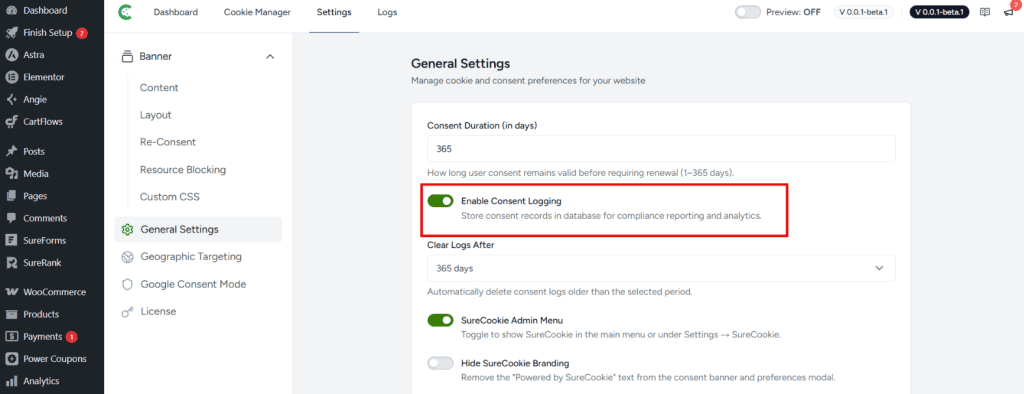
Once enabled, every consent action (acceptance, partial acceptance, or decline) will be logged and stored in your SureCookie database.
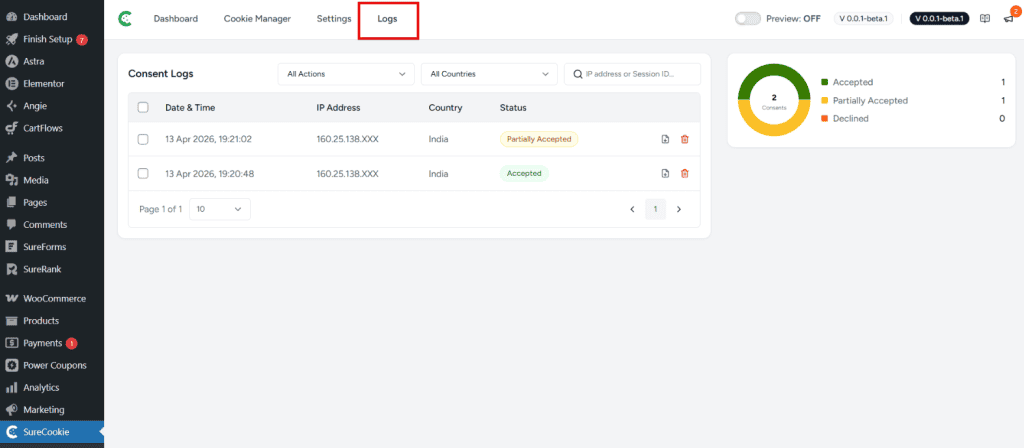
Accessing the Logs Section
To view your consent logs:
- Navigate to your SureCookie Dashboard
- Click on the Logs tab at the top of the page
Understanding the Logs Dashboard
The Logs section displays all user consent actions with the following information:
- Date & Time: The exact timestamp when the user interacted with your consent banner
- IP Address: The user’s IP address (partial for privacy)
- Country: The geographic location of the user based on their IP address
- Status: The consent action (Accepted, Partially Accepted, or Declined)
Consent Status Meanings
| Status | Description |
| Accepted | User has accepted all cookies and consent tracking |
| Partially Accepted | User has accepted some but not all cookie categories |
| Declined | User has declined all non-essential cookies |
Filtering Your Logs
The Logs dashboard provides filtering options to help you find specific consent records:
- All Actions: Filter by specific consent actions (Accepted, Partially Accepted, Declined)
- All Countries: Filter logs by the user’s country of origin
- Search by IP Address or Session ID: Use the search bar to find specific user sessions
Automatic Log Cleanup
To maintain database performance and manage storage, SureCookie can automatically delete old consent logs:
- Navigate to SureCookie > Settings > General Settings
- Select a duration in the Clear Logs After dropdown
- Consent logs older than this period will be automatically deleted
The Logs section gives you complete visibility into user consent choices while maintaining compliance records for audits and regulatory requests. Enable logging in your settings, use filters to find specific records, and configure automatic cleanup to keep your database optimized.
We don't respond to the article feedback, we use it to improve our support content.